Friday, 29 June 2012

How to Check If Your LinkedIn Password Was Stolen

Worried that your LinkedIn password may be a part of the nearly 6.5 million compromised on Wednesday? Password management firm LastPass has released a secure tool to see if your password was among the stolen.
News first surfaced about the security breach after a Russian hacker said he stole 6,458,020 encrypted LinkedIn passwords and posted them online (without usernames) to prove his feat. The breach comes on the heels of news that LinkedIn’s iOS app potentially violates user privacy by sending detailed calendar entries to its servers.
LinkedIn confirmed that some passwords had become compromised and said it would contact affected users with details on how to change their password.
SEE ALSO: LinkedIn Hacker Steals 1.5 Million Passwords from eHarmony [REPORT]
Although usernames associated with the passwords were not released, the passwords themselves will surely be used to help reverse-engineer other cryptography systems. We also expect to see these passwords added to dictionary lists of programs that attempt to break into various accounts.
In other words — if you’re a LinkedIn user, no matter how strong your password seemed — it’s a good idea to go ahead and change it.

How This Works

If you’re a cynical web user when it comes to privacy and security — of course you are, right? — then you’re probably asking yourself whether or not a site where you type in your password to see if it’s been compromised could possibly be legit. But the folks at LastPass ensure that the tool is safe and does not store passwords.
Here’s how it works: After typing your LinkedIn password into LastPass’s tool, the service computes its SHA-1 hash and sends the result to LastPass.com. It then searches the list of 6.5 million leaked password hashes.
“All that’s communicated to LastPass is the hash ‚Äî the result of the one-way function performed on the password that a user enters in that box,” a LastPass spokesperson told Mashable. “So let’s say you enter ‘password1.’ You enter it and the tool performs the hashing algorithm. The hash is then sent to LastPass, and if a match is found in the database (of the 6.46 million leaked hashes) on our end, we report back a message saying that your password was compromised.”
The spokesperson also noted that the hashes are not stored on its servers: “We don’t store the hash on our end. We only perform the check and then delete it.”
Brooklyn developer Chris Shiflett created a near-identical tool called LeakedIn that appears to operate in the exact same way. On his blog, Shiflett discussed how he built the tool to find out his own password was leaked (and subsequently cracked).

Change Your Password

If your password is among the millions stolen, you should not only change it as soon as possible but also update other accounts you have that use the same password.
If you aren’t already using a password management tool — it’s time to start considering one. Tools such as LastPass and 1Password are invaluable in helping users create and manage unique, secure passwords.
Has your password been compromised? Let us know in the comments.

6 Illegal Interview Questions to Avoid


6 Illegal Interview Questions to Avoid
Hamsa Ramesha
June 25, 2010
Wondering which questions you’ll be asked during your job interview? You should expect the usual ones, such as “Where do you see yourself in five years?” and “What’s your greatest weakness?” But then there are more colorful questions, such as “What animal best describes you?” and “If you were stranded on a desert island, what three items would you want to have with you?” that you should brace yourself for.
Regardless of what questions get thrown your way, there are a handful of interview questions you should never be asked. Be aware — questions about subjects in these categories violate your rights:
• Age• National origin
• Birthplace• Race
• Color• Religion
• Disability• Sex
• Marital/family status

However, don’t assume an employer’s prying questions are suggestive of discriminatory intentions. Often, a hiring manager is just trying to assess your fit for the job, not trying to illegally discriminate. While you can’t be asked directly about any of these topics, don’t be surprised if you find yourself discussing your family or religion with a potential employer either. It all depends on how the question is phrased.
While it’s important to protect yourself from illegal interview questions, there are legal alternatives to get the same information out of you. Be prepared and know your options by checking out these six examples of illegal interview questions, and how they can be rephrased to pass the law.
ILLEGAL: “Are you a U.S. citizen?”
LEGAL: “Are you authorized to work in the U.S.?”

Employers aren’t allowed to ask about your national origin, and that includes inquiring about your citizenship status. Touchy immigration issues aside, this question makes unnecessary assumptions based on your looks and racial stereotypes. On the flip side, employers can ask if you’re allowed to work in the U.S. By rephrasing the question, they’re avoiding directly asking if you’re a citizen, green card holder, or on a visa.
ILLEGAL: “How old are you? When did you graduate from college?”
LEGAL: “Are you over the age of 18?”

Whether you’re 18 going on 48 or 60 going on 40, employers are not allowed to discriminate against age (which is what the first question implies). However, when asked differently, the question becomes legal; the legal phrasing implies an age range, not a specific number. After all, employers need to know their employees are over 18 years of age to work legally in the U.S.
ILLEGAL: "Are you married? How many children do you have? Who do you live with?
LEGAL: “Can you relocate if necessary? Are you willing to travel as a part of this job? Can you work overtime as necessary?”

Your marital and family status is not being interviewed here — you are. Anything about your living situation, roommates, fiancés, spouses, children, etc., is off limits. While employers might simply be trying to gauge how busy you are in your personal life to see if it clashes with work responsibilities, it’s illegal to make a hiring decision based on this factor. As a potential employee, if you can commit to the necessary work hours and agree to the job requirements, your other responsibilities shouldn’t matter. Women should especially be wary of being asked for their maiden name — not required for employers if it isn’t legally your name. (But you can be asked if you’ve ever worked under another name.)

ILLEGAL: “How much do you weigh?”
LEGAL: “Are you comfortable with lifting heavy objects?”

While employers may want to make sure you’re physically able to do the job, asking directly about your weight/height and general health is a major HR no-no. Not to mention potentially embarrassing for you! But rephrasing the question to ask about your ability to perform a specific task is fair game.
ILLEGAL: “Do you have any disabilities? Any recent illnesses or operations?”
LEGAL: “Are you able to perform the essential job functions?”

Discriminating against the disabled, whether wheelchair-bound or clinically depressed, is a classic example of illegal hiring practices. But the employer still has a right to make sure you can do the job you’re hired for and rephrasing the question accordingly is within their rights.
ILLEGAL: “Ever been arrested?”
LEGAL: “Ever been convicted of ___?”

A general question about your (criminal) past is off topic, but a more targeted question regarding questionable behavior — as it relates to your job — is okay. For example, if you were applying for a job as a magician, it’s appropriate to ask if you’ve ever been convicted of fraud in your line of work.
It’s not so much what the question is asking, but how the question is asked. Federal and state laws prevent employers from asking interviewees about subjects unrelated to the job. However, if you feel you have been asked a question that’s off-limits, you should seek legal counsel. Before you take serious action, take into consideration the nature of the job, the context of the situation, the interviewer’s intent, and of course, the phrasing of the question. Good luck, and happy interviewing!

6 Bad Habits to Blame on Technology

Technology pretty much runs our lives these days. From our work life to our home life, we have computers, phones, and gadgets helping us with our daily routine. But is technology taking over and shifting our societal norms? Is too much technology a bad thing?
Sometimes we are so used to relying on technology to help us out, we forget how to act in a world void of it. We tend to blame technology for all those daily faux pas we commit. If you’ve ever heard or used (or even thought of!) any of these excuses, you’re not alone. Here are six of the most common bad habits we blame on technology.
“Hey, I know we’re having a conversation, but someone more important just texted me.”
You know the person: They take their phone out at the beginning of the meal or a conversation, and every 5 minutes or so they are checking to make sure they haven’t missed a text or email. Maybe that person is you! Nothing is more annoying than not having the attention of the person you are with, especially in a one-on-one situation. If you are in a group, it’s a little more acceptable.
Regardless, your annoying habit is saying that you really don’t care about the conversation or company, and you have better things to worry about. If that’s not the message you want to portray, put your phone away

6 Bad Habits to Blame on Technology

“I’m breaking up with you over a text message so I don’t have to deal with this in person.”
Accountability has gone out the window with the rise of technology and the web. The Internet gives us the option of not dealing with the immediate fallout of a situation. If you are mad at someone, you can leave a nasty comment on their Facebook wall. If you want to break up with your boyfriend, but don’t want to deal with the tears, you can shoot her a text.
The truth is, this solution only delays and amplifies the fallout. Now you have to deal with the original fight and explain the nasty Facebook post. Or you get the bad rap of being the girl who breaks up with guys via text. Hiding behind technology shows a lack of courage, and will only come back to haunt you in the end.
“Sorry I rear-ended your car, but I HAD to send this funny text to my friend.”
Texting and emailing while driving has become a dangerous pastime in this country. Actually, there’s a wide range of distracting activities people do while driving, but texting seems to be the most rampant. A whopping 81% of Americans admit to texting while driving, while around 30% of accidents are caused by texting while driving.
Bottom line: if your eyes aren’t on the road, you are being a reckless driver. You’re controlling a large, heavy piece of machinery, one that can crush an old lady or a group of girl scouts in a split second. If a message is so important that you have to send it right now, pull over to the side of the road before you text. It’s just safer.


“I know all my friends and family can see my Facebook updates, but I NEED to tell everyone how drunk I am right now.”
Facebook and Twitter have expanded the definition of TMI. Over-sharing has become a way of life for most, with little concern about how it might affect them later in life. Everything is searchable online these days. Want to post a status about how you were drunk and danced on a table at happy hour? Think about how it might affect a job search down the road.
If you really must share every detail of your life with the world, at least set up a filter system within Facebook to limit what your family and coworkers can see. Set your privacy settings on all your social networking tools to the highest setting. You will save face with your family and possibly save your job.
“OMG, LOL!! That is crazeeeee! TTYL!”
What does that even mean? It seems that more and more these days, the English language is being passed over for phonetic spelling and a random string of letters. We’re all for being efficient and quick communicators, but does needing a decoder ring to decipher your message really save me any time?
If you are texting good friends who understand your random acronyms, then feel free to keep using them. But if you’re sending texts or emails to family, coworkers, or, heaven forbid, your boss, keep the random spelling, shorthand, and emoticons out of the message.
“Sorry I’m an hour late, but I texted you to tell you I was running behind.”
You need to meet your friend in 15 minutes, and you haven’t even jumped in the shower. Oops. No problem, you can just text them and tell them you’re running late, right? Wrong. What if they are already at the place, because they like to show up early? Or what if they are already in transit? They still have to wait for you.
All concerns with being punctual have disappeared since you can now send a quick text saying that you aren’t going to make it on time. But texts don’t cover forgive all lateness sins. If you do it once in a while, you may be forgiven, but if you are texting “late” messages constantly, your friends might start to regard you as a flake.
What are your biggest technology pet peeves? What common courtesy do you wish people still abided by? Sound off in the comments!

The Best Action Camera

.

Testing Methodology

We strapped all four cameras to the handlebars of a mountain bike and went zooming around Brooklyn. One street ride, one trail ride, and one night ride. We also did a few static shots. The cams were crammed tightly, so none of them were mounted optimally (especially the Hero 2). Because of this, they all shake worse than they normally would. Plus, for bike stuff you really want the camera on your helmet, because the handlebars add too much vibration, even under ideal circumstances. We wanted to strap them to a surfboard, but the Atlantic Ocean, she would not cooperate. Instead, those that are waterproof were given an 8 hour soak test in 3 feet of water, and those that weren't were given a quick dunk, too.. As far as weighting: we looked at ease of use, mounts, features, and accessories, but video quality is king.

4th Place: Drift HD

The Best Action CameraThere's a lot of really great stuff about the Drift HD. For starters, it's the only one with an integrated LCD screen, so you can see your shot before you start recording (or during). This also makes it adjustable on the fly. Switching between modes (1080p or 720p, frame-rates, stills, etc.) is easiest on the Drift. The lens is rotatable, so you can get a level shot even when the camera is mounted askew. Other features include modes for time-lapse and burst photos, and a remote that can start and stop recordings. Without a special housing, it's only billed as water-resistant, not water-proof, but a) it floats, and b) we submerged it under two feet of water for an hour and it came out just fine. Nice.
Unfortunately, video quality is where the Drift falls flat. It's easily the worst of the group. Images are not at all sharp, and there's noise all over everything (especially in the night shot, but really, everywhere). It also handles contrast very poorly. Colors are way off. Just very, very muddy. You see that skipping in the first video for the Drift? That's not your browser acting up, that's in the raw video file. It didn't do that all the time, but the fact that it did that at all is troubling. If you want to go surfing or diving with it, you've got to buy a waterproof case for an additional $50. It's also somewhat limited in terms of available mounts. Also, there was some weird, shrieking sound that persisted throughout the video, though that may be unique to our unit. For the price you can do way better. [$300]

Drift HD Specs
Video: 25/30fps in 1080p, 25/30/50/60fps in 720p
Angle: 170 degrees in 1080p
Waterproof: Water-resistant w/o case
Storage: MicroSD
Battery: 1100mAh
Price: $300
Gizrank: 2.5


3rd Place: Ion Air Pro

The Best Action CameraThis is the baby of the bunch. The coolest thing about the Ion is that without any additional housing, it's waterproof to 30 feet, which should suffice for most non-scuba aquatic activities. All that in the same sleek form factor as the Contour, which gives it the lowest profile. It also has a unique and very versatile mounting kit. With the ball and socket setup, you don't have to detach and reattach anything in order to turn the camera around (which would be great for surfing). It's very intuitive to use for both shooting video and firing off stills. Possibly the best feature of all is that it vibrates when it starts and stops recording, so you know you're rolling even if the camera is mounted to your helmet. Really nice touch.
Again, video quality is where the Ion stumbles. It's not as bad as the Drift HD's, but it's not much better. There's just a ton of fuzz all over everything. Sharpness is a major problem (though colors are better than the Drift). Noise is very bad in low light. It also has a narrower angle in 1080 and 720 modes (127 and 150, respectively). The camera knows if it's upside down and will flip the video accordingly, but that's as far as it goes in terms of adjusting the angle. While the mount is easy to use and adjust on the fly, it's hard to crank it down hard enough so that it doesn't wobble when bumped or shaken. Also, like the Contour, you need another device (a computer or an iPhone) in order to change settings (frame-rates, etc.), which sucks. But this also allows you to control the camera with an iOS device or web browser. If you're committed to buying an Ion, skip the $350 Wi-Fi model, and the pared-down $230 Pro—go for the $290 Pro Plus kit with its included mounts for bikes and helmets.

Ion Pro HD Specs
Video: 30fps in 1080p, 30/60fps in 720p, 30fps in 960p (4:3)
Angle: 127 degrees in 1080, 150 degrees in 720
Waterproof: Waterproof w/o case to 30 feet
Storage: MicroSD
Battery: 1100mAh
Price: $290
Gizrank: 3.0


2nd Place: Contour+

The Best Action CameraThe Contour+ offers really nice video quality—images are extremely sharp. It was the favorite in the low-light test. While it was darker than the others, it didn't artificially brighten images into horrible noise. Speaking of noise, sound quality on the Contour+ is easily the best. It has a nice, low profile, and it's generally very easy to mount securely on either of its sides. It has a simple on/off switch (like the Ion) so it's pretty easy to tell when you're recording, and it starts shooting quickly. The Plus is Contour's high-end solution with built-in Bluetooth, so you can use your iPhone or Android as a monitor while you record. There are tons of optional accessories, including some that let you broadcast live to USTREAM. Also, the rotatable lens will allow you to adjust to any angle, and it has built-in GPS for automatically geotagging your videos.
At $500, the Contour+ is by far the most expensive of the cameras we tested. For all that money, it's not even waterproof. At all. It says "water-resistant," so we gave it a quick dunk. It instantly filled with water. Oops. If you want to take this thing in the water (or anywhere near it) you need to drop an extra $50 on the waterproof case. There's a switch to flip between two settings (1080p @ 30fps or 720p at 60fps by default), but beyond that, settings can't be changed without attaching to a computer. Really, really annoying. Also, if you want the full 170-degree angle, you can only get that in 720p mode. Connecting to a phone via Bluetooth yielded mixed results—you had to stay pretty close to the camera, and most of the time it displayed choppy video. For the best value, go with the Contour ROAM. For only $200 (or $250 with the waterproof case and surf mount) it has the same optics/image sensor as the Plus, but it's actually waterproof for up to 3 feet—better than nothing. You don't need the Plus's GPS and Bluetooth. ($500)

Contour+ Specs
Video: 25/30fps in 1080p, 25/30/50/60fps in 720p, 25/30fps in 960p (4:3)
Angle: 170 degrees in 720 only
Waterproof: Not waterproof w/o case. W/ $50 case: 197 ft
Storage: MicroSD
Battery: 1050mAh
Price: $500
Gizrank: 3.5


BESTMODO: GoPro Hero 2

The Best Action CameraIn terms of image quality, the Hero 2 simply won out. It's about on par with the Contour in terms of sharpness, but when it comes to colors, the Hero simply dominates. It also handles contrast better than the others. All of the kits come with a waterproof housing, which keeps the camera dry up to 197 feet deep. There are tons of mounting options and accessories—battery extenders, strap-on LCD screens, and a Wi-Fi BacPac that lets you control up to 50 GoPros at once from a distance of up to 600 feet. The built-in screen ain't much to look at, but you can adjust settings on the fly, like frame-rates, stills, and time-lapse, which is clutch when you're in the field. The LCD BacPac lets you instantly play back video. This is the only camera that uses ubiquitous, high-capacity, full-sized SD cards. The 170 degree angle in 1080p is great, and it easily produces the best daytime video. (If you want to see surf footage from the Hero 2, check out our lightning review.)
That said, it isn't without its flaws. The boxy design gives it an awkward profile. Sometimes it's harder to mount because of that, and it increases water resistance while swimming. Also, you can manually flip video 180 degrees, but there is no incremental adjustment. As you can see in the video, the Hero 2 was off-kilter (which wasn't its fault—it went on last and there wasn't enough room on the handlebars), so a twistable lens would have been great. Nighttime footage isn't amazing, but it finished a solid second behind the Contour. The most annoying thing about the Hero is that buttons are very hard to press, so adjusting the settings takes some work (and it's hard to do with gloves on). Despite that, if the camera gets mashed into the ground or another object, accidental button presses can occur. Also, the beeps aren't loud enough, so you don't always know if you're rolling or not, which could kill your perfect shot. It takes a while to scroll through the GoPro's menu, but it's certainly better than no onboard menu at all. Despite the gripes, the Hero 2 remains is the clear winner. ($300)

GoPro Hero 2 Specs
Video: 30fps in 1080p, 30/60fps in 720p, 48/30fps in 960p (4:3)
Angle: 170 degrees in 1080p
Waterproof: Waterproof to 197 feet w/ included case
Storage: Full-sized SD card
Battery: 1100mAh
Price: $300
Gizrank: 4.0

10 most demanding IT jobs, rated

Summary: On average, a new survey finds, IT professionals are required to be available to work 119 hours in each 168-hour week.

Many readers have been tethered to a pager (or now a smartphone) at some point in their career, driving down to the data center at 2 am to restart a system or fix a corrupt file in the database. It’s not fun, but in an always-on, 24×7x365 world, someone has to keep the lights on. And while great strides have been made in IT automation, there still needs to be human operators to keep things humming.
Photo by Michael Krigsman
Along these lines. Emerson Network Power just released an interesting report on “The Most Always-On IT Jobs,” based on a survey of 792 IT professionals in Asia, Europe, Latin America and the United States. The criteria is that these are jobs in which the IT professional has to be always available, always working at peak capacity and always accurate.
The top 10 “Always On” IT positions include the following. Interestingly, it includes most major IT jobs. What does this tell us? Emerson notes this as well, stating that all IT jobs are highly Always-On, averaging a score of “71″ on a 0- to 100-point Always-On scale.  On average, the survey also finds, IT professionals are required to be available to work 119 hours in each 168-hour week. The higher level the job, the more Always-On.
1. Executive Director/Administrator: “All survey respondents performing this high-level role agree they work on many projects at once, and that their work requires a high level of intelligence…. They are accountable for success, and that translates into high job demands…. These IT pros have their heads and hands into every aspect of the job: strategic, operational, technical.”
2. IT Procurement Manager: For these folks, the phone never stops ringing. “These Always-On professionals point to multiple pressures: urgency, demanding clients (often in different international time zones), staying up on the latest equipment, filling pressing staffing needs.”
3. CIO: CIOs in the Emerson survey say they need “to work on many projects at once and make important decisions quickly. And those decisions can be required any time….  Other respondents mention they have to be available to take emergency calls and have been tracked down even on vacation. Demands of the job also include motivating and orchestrating the work of others, making sure all team members are performing to their abilities and ‘getting everyone on the same page’ for projects.”
4. IT Manager/Director: “Professionals in this role might be called on to put out fires or do routine work at any time, including nights and weekends….  Respondents say demands on the IT manager/director include juggling several projects at once, solving problems quickly and working at peak capacity at all times…. Respondents say they have responsibility for a large portion of the company’s budget and for leading the meetings he or she is in.”
5. IT Operations Manager: “Respondents employed in IT operations give many titles, including technician, manager, analyst, operator and specialist. They report working on high-stress projects with constant time pressure and responding to after-hours incidents.
6. Data Center Manager: This is also a job requires a high level of intelligence, necessary in a role “encumbered with multiple responsibilities and high-stress demands. For example, data center managers were in the top three for ‘dependencies/multi-tasking,’ the top four for ‘availability’ and the top five for “quick response.”
7. Engineering: “Perfection, quick response, good communication and time management skills, and the ability to work on structure and design are cited as job demands.”
8. IT Security: “Making emergency decisions is noted as a typical demand of the job. Likewise, 89% of the security pros agree or strongly agree they make important decisions quickly – the highest score of all the IT roles. On the other hand, this group scores lowest on quick response. More than half (57%) of IT security respondents agree that success depends on things out of their control. While being in control and accountable can contribute to Always-On, we think lack of control can lead to frustration in a role that generally is Always-On.”
9. Applications/Software Developer: “One-third or less of professionals in this category report having no time for quality work (33%) and no time to think things through (26%). Demands of the job include developing new applications for the workplace or industry, some involving highly complex issues. So it’s not surprising that 87% of respondents agree that others depend on their work a great deal.”
10. Database Manager:”The survey responses from database managers reveal an Always-On profile similar to applications/software developers.” A majority, 87%, of database managers say “others depend on their work a great deal. Where the two areas diverge is on certain indicators of working capacity/bandwidth. Over half (58%) of database managers agree they have no time for quality work, and 47% agree they have no time to think things through.”
Kick off your day with ZDNet's daily e-mail newsletter. It's the freshest tech news and opinion, served hot. Get it.

Mio’s Alpha Kickstarter Project Is A Very Cool, Touch-Free Heart-Rate Monitor Watch

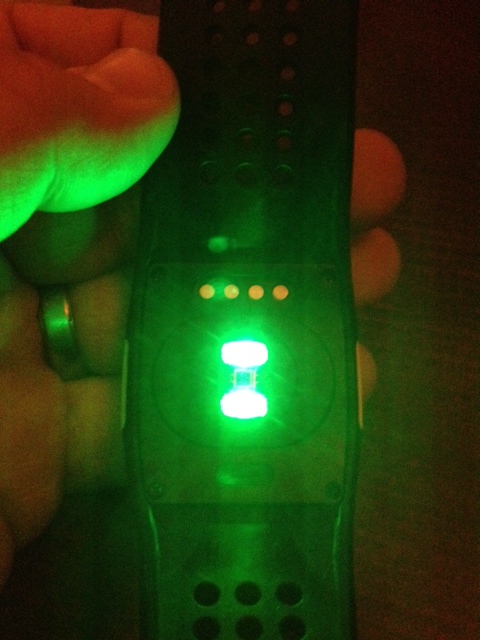
photo (1)
Mio made some fairly cool heart-rate watches a few years ago but they required you to place a finger on two little pads while running in order to take the measurements. It was interesting, and when you consider that most other heart-rate watches require a chest strap, fairly unique. However, nobody wanted to touch a little thinger just to get their heart rate.

Enter the Mio Alpha. This new product uses a precise light sensor to sense your heart rate on the go. No straps, no muss, no fuss. It’s pretty ingenious.
I got a chance to sit down with the watch a few days ago and I was really impressed. They’re tooling up right now to start manufacturing them and they will cost $99 when you pre-order through Kickstarter. The watches work by sensing changes in blood volume moving through the skin. It takes a moment to begin sensing but once it’s figured out your heart rate it’s ready to go. A small LED on the top tells you if you’re in the proper heart-rate zone and you can program it for various activity levels.
They’re looking for $100,000 and they’ve already hit $30K so things look good for an on-time arrival. Given that this watch does away with annoying straps and futzing, I’m pretty excited

GameStop Taking Galaxy Nexus 7 Pre-Orders

Google Nexus 7
GameStop is now taking pre-orders for Google's new Nexus 7 tablet.
The retailer confirmed this week that it is accepting pre-orders in U.S. stores and online for the 16GB version of the Nexus 7, which costs $249.99.
Google and GameStop said the tablet will be released in mid-July, though the GameStop website lists the release date as July 31.
GameStop will also offer a 30 percent trade bonus on items traded towards the pre-order of a Nexus 7. That includes video game hardware, software and accessories as well as Apple gadgets and other Android-based devices.
"We've seen great consumer enthusiasm for our recommerce initiatives, particularly our iDevice trade program that launched last fall," GameStop president Tony Bartel said in a statement. "With the increasing popularity of Android tablets and the emerging multiscreen gaming trend, this is the ideal time to expand the program to meet the needs of our hybrid customers."
GameStop is also offering cash or store credit for select Android tablets. Last month, the retailer expanded its Android tablet offerings, adding the tablets to more than 1,600 stores nationwide. GameStop first started selling the Acer A100, Asus Transformer, and Samsung Galaxy Tab in 200 stores last October.
Google unveiled the Asus-based Nexus 7 tablet at its Google I/O conference this week. The 7-inch tablet will run the latest version of Android, Jelly Bean, boasts a 1,280-by-800 HD display, and runs a Tegra 3 chipset with a quad-core CPU and 12-core GPU.
Google is also selling an 8GB version of the Nexus 7 tablet for $199 to customers in the U.S., U.K., Canada, and Australia.
For more, see Hands On With Google's Nexus 7 Tablet and the slideshow below.